Sep 29, 2025
Wie erfasse ich den Stromverbrauch (und weitere Metriken) meiner Wolf Wärmepumpe?
Eingebaut ist eine "CHA-07/400V" Monoblock-Wärmepumpe, und im Steuergerät ein "WolfLink Pro" zur Digitalisierung.
Wolflink verbinden mit Netzwerk
Gemäß Anleitung ohne Smartset App möglich:
Das Gerät spannt einen WLAN Acccess Point auf, mit dem verbinden und dann auf http://192.168.1.1 navigieren.
Die MAC-Adresse vom Access Point deutet auf einen ESP Microcontroller hin, das erklärt das instabile WLAN. Evtl hilft es, Hintergrund-Dienste zu pausieren, die bei Netzverbindung versuchen ins Internet zu kommen (Nextcloud client etc). Android mag WLANs ohne Internet auch nicht gerne.
Ethernet-Port hat das ding auch, bei dem funktioniert die Verbindung einwandfrei und zuverlässig. Ab Werk muss man da nur DHCP liefern, und dann halt die IP Adresse per http ansteuern die der Wolflink darüber bekommen hat.
Wolflink konfigurieren
HTTP Basic Auth
- Benutzername:
admin
- Passwort: Steht auf der Rückseite, ist das gleiche wie fürs WLAN
Das Gerät meldet sich per DHCP als "wolflink", wenn der DHCP-Server den Namen über DNS auflöst braucht man keine IP zu suchen/pflegen.
Das Webinterface ist scheinbar immer per LAN und WLAN erreichbar.
Die Wolflink Website hat 3 Unterseiten:
Status page
General Info
- Serial number: xxxxxxxxxxxx
- Firmware version: 4.50.0
- System name: NameIConfiguredMyself
Network
- Ethernet status: Not connected
- Ethernet MAC address: 04:83:08:xx:xx:xx
- Wi-Fi status: Connected
- Wi-Fi MAC address: 04:83:08:xx:xx:xx
- Wi-Fi SSID: MyHomeWIFI
- IP address: 1.2.3.4
- Access point: Active
- Access point SSID: WOLFLINK-xxxxxx
- Smartset portal status: Connected
- Local connection status: Not connected
Bus
- eBus: Connected
- ModBus: Not connected
Netzwork page
(passwort-geschützt, siehe "Basic auth" oben)
- Zeigt WLAN SSIDs deren Beacons vom Wolflink empfangen werden.
- Erlaubt ein WLAN zu konfigurieren mit SSID, Password und Auth (WEP, WPA, WPA2 Personal, WPA3 Personal, WPA/WPA2 Personal, WPA2/WPA3 Personal), sowie DHCP oder statische IP zu setzen.
- Erlaubt den eingebauten Access Point zu deaktivieren.
- "Start WPS" button
Settings page
- Checkbox "Enable internet connection to the WOLF Smartset portal server" (ab Werk aus)
- Password Ändern-Box
- System Name
- Reboot button
Daten auslesen ohne Cloud
"Wolflink pro" ist wohl das gleiche wie ISM7e: https://forum.iobroker.net/topic/73491/wolf-link-home-ism7i-ism8i-was-ist-n%C3%B6tig
Dafür hat jemand C# Software geschrieben, die von dem Gerät die Metriken ausliest: https://github.com/zivillian/ism7mqtt.
Laut Quellcode wird dafür über Port 9092 oder 9091 mit XML Daten kommuniziert.
Das funktioniert auch entsprechend Anleitung:
podman run -it --rm --entrypoint /bin/sh --name ism7config zivillian/ism7mqtt:latest
$ /app/ism7config --help # hiermit die config Datei erzeugen
# in einem anderen Terminal auf dem host die config Datei extrahieren:
# podman cp ism7config:/app/parameter.json ./ism7-parameter.json
podman run -it --rm -e ISM7_MQTTHOST=nas.home.arpa -e ISM7_IP=wolflink.home.arpa -e ISM7_PASSWORD=stehtAufDemAufkleber -v ./ism7mqtt.parameter.json:/app/parameter.json:Z zivillian/ism7mqtt:latest
Stirbt dann aber:
System.IO.InvalidDataException: timeout
at ism7mqtt.Ism7Client.OnInitialValuesAsync(IResponse response, CancellationToken cancellationToken) in /app/ism7mqtt/ISM7/Ism7Client.cs:line 297
at ism7mqtt.ResponseDispatcher.DispatchAsync(IResponse response, CancellationToken cancellationToken) in /app/ism7mqtt/ISM7/ResponseDispatcher.cs:line 32
at ism7mqtt.Ism7Client.ReadPipeAsync(PipeReader source, CancellationToken cancellationToken) in /app/ism7mqtt/ISM7/Ism7Client.cs:line 191
System.Net.Sockets.SocketException (125): Operation canceled
at System.Net.Sockets.Socket.AwaitableSocketAsyncEventArgs.ThrowException(SocketError error, CancellationToken cancellationToken)
at System.Net.Sockets.Socket.AwaitableSocketAsyncEventArgs.System.Threading.Tasks.Sources.IValueTaskSource<System.Int32>.GetResult(Int16 token)
at ism7ssl.Ism7SslStream.ReadAsync(Memory`1 buffer, CancellationToken cancellationToken) in /app/ism7ssl/Ism7SslStream.cs:line 154
at ism7mqtt.Ism7Client.FillPipeAsync(PipeWriter target, CancellationToken cancellationToken) in /app/ism7mqtt/ISM7/Ism7Client.cs:line 145
Verpacken in einer shell-loop hilft, aber evtl sehe ich deshalb nicht alle Metriken auf dem MQTT Bus (händisch hübsch formatiert):
$ mosquitto_sub -h nas.home.arpa -F '@Y-@m-@dT@H:@M:@S@z %t %p' -q 2 -t 'Wolf/#'
2025-09-29T22:46:34+0200 Wolf/wolflink.home.arpa/BM-2_0x35
{
"Funktion des Bedienmoduls": { "value": 0, "text": "System" },
"Zeitprogramm Zirkulation Heizgerät": { "value": 1, "text": "1" },
"Raumeinflussfaktor": 4,
"Außenfühler gemittelt Berechnungszeitraum": 3,
"Antilegionellenfunktion": { "value": 0, "text": "Aus" },
"Freigabe Parallelbetrieb": { "value": 0, "text": "Aus" },
"Raumtemperaturabhängige Abschaltung": { "value": 1, "text": "Ein" },
"Absenkstopp": -16,
"Warmwasserminimaltemperatur": 45,
"PI-Regler Raumtemperatur Kp": 20,
"PI-Regler Raumtemperatur Tn": 1,
"Startzeit Antilegionellenfunktion": "18:00:00",
"Uhrzeit": "22:46:00",
"Datum": "09/29/2025 00:00:00",
"Partymodus": { "value": 0, "text": "Deaktiviert" },
"Urlaubsmodus": { "value": 0, "text": "Deaktiviert" },
"Anforderung Lüftung": { "value": 8, "text": "Automatik AUS" },
"1x Warmwasser": { "value": 0, "text": "Aus" },
"BUSCONFIG_Erkannte-Geraete-Low-Byte": 256,
"BUSCONFIG_Erkannte-Geraete-High-Byte": 0,
"BUSCONFIG_Softwareversion": 330,
"BUSCONFIG_Sollwertkorrektur": -1,
"SmartHome System": { "value": 0, "text": "keine Verbindung" },
"Freigabe SmartHome": { "value": 1, "text": "Ein" },
"Außentemperatur": 15.2,
"Wartungsmeldung": { "value": 0, "text": "Aus" },
"BUSCONFIG_Vereinfachter-Modus": 0,
"Programmwahlschalter gemeinsam": { "value": 1, "text": "Ein" },
"Anpassung Raumfühler BM-2 0": 0,
"Korrektur Außentemperatur": 0,
"BUSCONFIG_SmartHome-System": 0,
"BUSCONFIG_Programmwahlschalter-Gemeinsam": 1,
"Firmware": 3.3,
"Uhrzeit Ende": { "330000": "01:46:00", "330006": "01:46:00" },
"Datum Ende": { "330001": "09/30/2025 00:00:00", "330007": "09/30/2025 00:00:00" },
"Uhrzeit Start": { "330002": "22:46:00", "330008": "22:46:00" },
"Datum Start": { "330003": "09/29/2025 00:00:00", "330009": "09/29/2025 00:00:00" },
"Uhrzeit BM2": { "330004": "22:46:00", "330010": "22:46:00" },
"Datum BM2": { "330005": "09/29/2025 00:00:00", "330011": "09/29/2025 00:00:00" }
}
2025-09-29T22:46:34+0200 Wolf/wolflink.home.arpa/DHK_BM-2_0x35
{
"Raumtemperatur": { "340000": -3276.8, "340041": -3276.8 },
"Gemittelte Außentemperatur": 16.8,
"Anforderung Heizkreis": { "value": 8, "text": "Automatik aus" },
"Heizkreis Status": { "value": 5, "text": "AT Abschaltung" },
"Sparfaktor": 4,
"Winter/Sommer Umschaltung": 17,
"ECO/ABS": 10,
"Tagtemperatur": { "340009": 20, "340035": 20, "340040": 20 },
"Raumeinfluss": { "value": 0, "text": "Aus" },
"Vorlauftemperatur": 37,
"Sockeltemperatur Heizkurve": 30,
"Startpunkt Heizkurve": 20,
"Normaußentemperatur Heizkurve": -16,
"Vorlauftemperatur Heizkurve": 65,
"Zeitprogramm": { "value": 1, "text": "1" },
"Sollwertkorrektur": { "340026": -1, "340031": -1 },
"Programmwahl": {
"340029": { "value": 1, "text": "Auto" },
"340032": 1
},
"Reglertyp": 1,
"aktuelle Kreisart in Kombination mit Heizgerät": { "value": 0, "text": "Heizkreis" },
"Raumeinfluss Kühlen": { "value": 0, "text": "Aus" },
"Kühlkurve global": 0
}
2025-09-29T22:46:34+0200 Wolf/wolflink.home.arpa/WWSystem_BM-2_0x35
{
"Warmwasser Status": { "value": 9, "text": "Aus" },
"Zeitprogramm": { "value": 1, "text": "1" },
"Warmwassersolltemperatur eingestellt": { "350009": 45, "350014": 45 },
"Programmwahl": {
"350012": { "value": 1, "text": "Auto" },
"350015": 1
}
}
Auch wenn der Hersteller es wohl nicht supporten mag: https://forum.iobroker.net/topic/73491/wolf-link-home-ism7i-ism8i-was-ist-n%C3%B6tig/2
Das ISM7 kann wohl nur eine Verbindung, d.h. während ism7mqtt läuft kann man die SmartSet App und Cloud nicht nutzen: https://www.heizungsforum.de/threads/ism7i-linkhome-oder-linkpro-fuer-cgb-20.10994/#post-371729.
Daten auslesen mit Cloud
- Daten an die Cloud senden erlauben im wolflink webinterface
- Auf https://www.wolf-smartset.com/ einen Account anlegen mit username, Vorname, Nachname, E-Mail, Land
- Eingeloggt dann die Seriennummer und das Passwort des Wolflink eingeben
- Sofort erscheint es in der "Anlagenliste" mit einem Wolken-Icon das signalisiert ob es Daten an die Cloud schickt
- Klick auf "Öffnen" zeigt die geschickten Werte und ermöglicht Anpassung diverser Parameter
- Für Detais muss man ggf das Fachmann-Passwort eingeben, das ist ab Werk
1111
- Browser-Entwicklertools verraten, dass alle 10 Sekunden von https://www.wolf-smartset.com/portal/api/portal/GetParameterValues ein JSON mit den aktuellen Messwerten abgerufen wird, das aber nur die aktualisierten Werte enthält, also meistens leer ist (bis auf einen Zeitstempel "LastAccess").
Home Assistant Integration
https://www.home-assistant.io/integrations/wolflink/ liest die Daten aus der Wolf Smartset Cloud aus.
Stromverbrauch messen
Von ISM7 und Smartset Cloud kommen die interessanten Energie-Messwerte:
- Leistungsaufnahme (WP + EHZ) in kW
- Energiemenge HZ, ID 270059 in kWh
- Energiemenge WW, ID 270060 in kWh
- Erzeugte Wärmemenge aktueller Monat, ID 270163 in kWh
- Erzeugte Wärmemenge aktuelles Jahr, ID 270165 in kWh
Energiemenge HZ plus Energiemenge WW sind genau die Erzeugte Wärmemenge im aktuellen Zeitraum, also wohl auch kein Stromverbrauch.
Laut https://forum.iobroker.net/topic/71084/wolf-cha-10-verbrauchsdaten-erfassen zählt das Gerät auch selbst keinen Strom.
Bei max. 10-sekündiger Aktualisierung des Wertes aktuelle Leistungsaufnahme bringt es wohl auch nichts, diesen Wert zu integrieren, siehe auch https://www.photovoltaikforum.com/thread/183019-erfahrungen-mit-der-wolf-cha/?postID=4457326&highlight=ism7%2Bstrom#post4457326 (der ganze Thread von mehreren hundert Posts hat wahrscheinlich viele Infos zu dem Gerät).
Also braucht es für die Erfassung des Stromverbrauchs der Wärmepumpe dann wohl einen extra 3-Phasen-Zähler, zB einen Shelly 3EM.
Evtl. ändert sich daran ja demnächst was mit der neuen Photovoltaik-Integration qua Gesetz: https://www.baulinks.de/webplugin/2025/1327.php4 "Sie unterstützen die EEBus-Anwendungsfälle Monitoring of Power (MPC) und Limitation of Power Consumption (LPC)"
Herstellerinfo: https://www.wolf.eu/de-de/professional/wissensmanagement/heizung/energiemanagement-waermepumpe#toc4 und verlinkt https://oxomi.com/p/2024876/catalog/4802251?oxDeeplink=e30%3D
Mär 20, 2025
Zielsetzung Energieverbrauch minimieren, dafür Vorlauftemperatur minimieren
- Wärmepumpe arbeitet umso effizienter, je geringer der Temperaturhub ist. Vorlauf > 55°C gilt als ineffizient
- (Gas)Brennwertgerät: Erhöht Effizienz (ggü Heizwertgerät), indem Wasserdampf kondensiert wird, der bei Verbrennung entsteht (bei Gas mehr als bei Öl wegen mehr Wasserstoff-Atomen). Dies umso besser/mehr möglich, je geringer die Temperatur am Wärmetauscher ist, und über 57°C nicht möglich. Der Wärmetauscher hat Rücklauftemperatur, diese ist um so niedriger je geringer die Vorlauftemperatur ist (weil Heizkörper nur begrenzte Menge Wärme abgeben können).
https://www.zukunftaltbau.de/ee-fit
https://www.viessmann.de/de/wissen/technik-und-systeme/gas-brennwertkessel/funktion.html
Luftfeuchte
Die relative Luftfeuchtigkeit sollte in der Heizperiode nicht über 60 bis 65 Prozent liegen
-
Gebäudeklima "früher": Durch Fenster-/Türschlitze zieht kalte Luft rein. Heizung sehr heiß um angenehme Temperatur zu erreichen (+ Strahlungswärme steigert Komfort), zB Holzofen. Recht warme Abgase ziehen Wärmeenergie "zum Schornstein raus", nehmen Luftfeuchte mit.
-
Gebäudeklima heute: Minimierung von Wärme-Energie-Verlusten durch bessere Dämmung ("zugeklebt") und geringe Abgastemperaturen (soweit vorhanden) → kein (Kamin)Zug mehr. Anfallende Feuchte (Kochen, Duschen, Wäschetrocknen, Atmen) muss anders entfernt werden → Lüftungsanlage mit Energierückgewinnung (Wärmetauscher).
https://www.zukunftaltbau.de/eigentuemer/heizung-erneuerbare-energie/richtig-heizen-und-lueften
(TODO: Quellen für alles)
Heizkurve optimieren
Optimierung Heizkurve:
- Raumtemperatur generell zu niedrig: Niveau erhöhen
- insbesondere an kalten Tagen zu niedrig: Neigung erhöhen
- in der Übergangszeit zu gering, an kalten Tagen ok: Niveau erhöhen, Neigung senken
- in der Übergangszeit zu hoch, an kalten Tagen ok: Niveau senken, Neigung erhöhen
Heizkurve bei Buderus RC35
Fußpunkt: bei 20°C Außentemperatur 20°C Vorlauf-Soll. (Angepasst über Raumtemperatur-Soll: dessen Abweichung zu 20°C = Parallelverschiebung)
Steigung: Vorlauf-Soll bei Auslegungstemperatur. Auslegungstemperatur einzustellen in Anlagendaten.
Nachtabsenkung sinnvoll?
In schlecht gedämmten Häusern: ja
https://www.energie-experten.org/heizung/heizungstechnik/heizungssteuerung/nachtabsenkung
Sep 26, 2024
I own/operate a freifunk router, running the Freifunk Darmstadt firmware which is based on gluon, which itself is based on OpenWRT.
I'd like to monitor the operation of my node (e.g. wifi client count on 2.4 and 5 GHz), but I want to avoid building my own firmware image. I already have prometheus and grafana running, so all I need is a node_exporter on the device exporting metrics over HTTP. I can install such with opkg install prometheus-node-exporter-lua, but whenever the autoupdater installs a new firmware version (often), I'd have to manually repeat that installation.
As noted in the gluon wiki this can be automated using /etc/rc.local which is run on each boot. Just add the following snippet (before the closing exit 0):
if ! test -e /usr/bin/prometheus-node-exporter-lua ; then
sh -c 'sleep 60 && \
logger "installing prometheus-node-exporter-lua"
opkg update
opkg install prometheus-node-exporter-lua \
prometheus-node-exporter-lua-nat_traffic \
prometheus-node-exporter-lua-netstat \
prometheus-node-exporter-lua-openwrt \
prometheus-node-exporter-lua-wifi \
prometheus-node-exporter-lua-wifi_stations
logger "installing prometheus-node-exporter-lua returned $?"
' &
fi
Waiting 60 seconds after boot hopefully is enough for the WAN network to be up.
Correct operation can be tested by running the file manually: bash /etc/rc.local and checking for the "installing ... returned ..." line with logread -f.
Jul 29, 2023
I very much enjoyed "The Nightmare Stacks" by Charles Stross, my favourite book of the "Laundry Files" series (as released so far).
The plot being placed in a real place, I used the excellent umap website to draw the places & campaign movements named in the book as an openstreetmap overlay (actually 3 layers: places & leylines from the preparation phase, second the campaign of the Host of Air and Darkness, third the counter-movements by the Urük):
See full screen
Jan 06, 2023
Things about CheckMK not (easily) found in the documentation.
Every host is pinged, this service is named "Check_MK".
Run containerized version in podman with podman --cap-add net_raw for ping to work
Install Plugins in containerized Raw edition:
$ podman exec -it -u cmk checkmk /bin/bash
OMD[cmk]:~$ cd /tmp
OMD[cmk]:~$ curl https://raw.githubusercontent.com/f-zappa/check_mk_adsl_line/master/adsl_line-1.3.mkp
OMD[cmk]:~$ mkp install adsl_line-1.3.mkp
Monitoring RHEL7
- has systemd v219, the agent requires 220. remedy: "legacy mode"
- avoid xinetd? use Agent over SSH
- ssh known_hosts in checkmk container: run
cmk --check $hostname which lets "the correct" ssh ask for accepting the host key. podman -u cmk $containername /bin/ssh $hostname did not suffice in my case
IPv6
checkmk defaults to IPv4 only, change in Settings > Folder "Main" > Dual stack. Selecting "both" will do ping4 and ping6 checks separately.
podman container gets no public route, only link-local (fe80:), thus IPv6 pings to public addresses fail.
Apparently an open issue: https://github.com/containers/podman/issues/15850.
Dez 27, 2022
Project context: reading environmental sensor data from card10 into influxDB.
GATT / ESS
epicardium (C Firmware) exports sensor data over Bluetooth GATT ESS (environmental sensing service).
GATT requires pairing, connecting → only 1:1, encrypted
Reading possible with card10_iaq_notify.py from https://git.card10.badge.events.ccc.de/card10/firmware/-/merge_requests/508/diffs
Turns out the eCO2 values computed by the BSEC values are quite bogus, compared to a proper CO2 NDIR sensor: https://dm1cr.de/co2-sensor-vergleich. I replicated these results:

Now the idea is to check if the raw resistance values from the BME680 have some better correlation to actual CO2 values, without the intelligence from the proprietary BSEC library.
Epicardium has these values, but doesn't export these over bluetooth ESS. So instead, use a python script to do BT-LE advertisements ourselves: https://codeberg.org/scy/sensible-card10/ And extend it to include the raw resistance value.
reading GAP / BLE advertisements on linux
This is a real problem due to lack of documentation of bluez5. Most online searches turn up the deprecated hcitool and friends. There is a python library bluepy which implements BLE advertisement scanning, but docs are limited too: https://ianharvey.github.io/bluepy-doc/. Some blogpost mentions the backend binary bluepy-helper which can also be talked to directly: https://macchina.io/blog/internet-of-things/communication-with-low-energy-bluetooth-devices-on-linux/
GAP ~= beacons, limited data rate, 1:n, unencrypted. See https://elinux.org/images/3/32/Doing_Bluetooth_Low_Energy_on_Linux.pdf, https://learn.adafruit.com/introduction-to-bluetooth-low-energy?view=all
Check source is sending advertisements (card10 serial, sudo picocom -b 115200 /dev/ttyACM0 had python stacktrace in my case).
bluetooth snooping using bluez' btmon: no filtering, e.g. A2DP clutters.
Better: the reference tool blescan from bluepy:
$ sudo blescan -a -t0
Device (new): ca:4d:10:XX:XX:XX (public), -70 dBm
16b Service Data: <1a18c2cccc071b16187e0f00b100016c00860260>
Complete Local Name: 'card10'
Copy implementation to implement own data parsing:
from bluepy import btle
class ScanPrint(btle.DefaultDelegate):
def handleDiscovery(self, dev: btle.ScanEntry, isNewDev: bool, isNewData: bool):
magic, version, temp, hum, press, gr, iaqa, iaq, eco2, battery = \
struct.unpack('<HHhHLhBHHB', dev.getValue(btle.ScanEntry.SERVICE_DATA_16B))
# ScanEntry.getValueText() parses bytes into hex-digits, but struct.unpack() needs bytes from getValue
Dez 15, 2022
Example scan a Credit Card, resulting in a PDF with two pages, each containing the image of one side of the card.
Join the images, put them onto one page (and add some 10px distance between them):
pdfjam input.pdf --nup 1x2 --noautoscale=true --fitpaper=true --delta "10 10" --outfile out.pdf
Aug 25, 2022
My fedora 35 had its plasmashell process stuck at 100% CPU, after some switching between wayland and X11 sessions. When trying to change global keyboard shortcuts (e.g. Alt-F1 for the App-Menu Launcher), it would freeze completely for like 30 seconds, repeatedly.
A new user wouldn't have that problem.
The fix was to remove ~/.config/plasmashellrc.
Sep 24, 2020
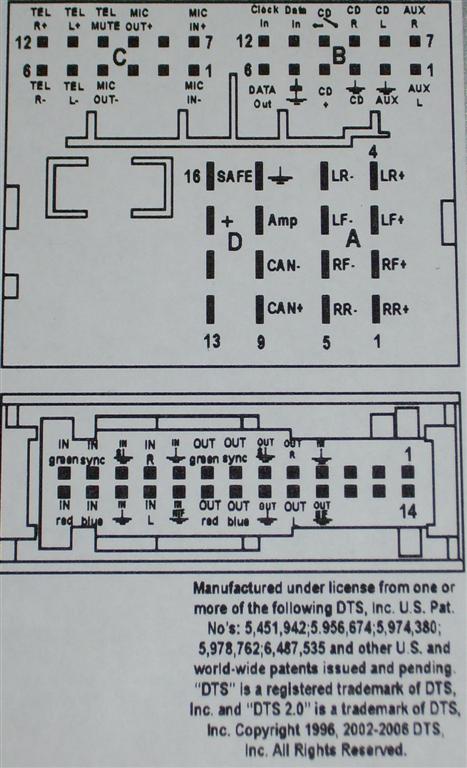
- physikalischer Einbaurahmen: 2DIN ist ein Standard, der eigentliche Schacht im Skoda ist aber größer & man braucht einen (Plattform-spezifischen?) Rahmen vorne, der auf die Befestigungsschrauben mappt
- "Standard" ist der ISO-Stecker, VW+Skoda+... nutzen Quadlock
-
Radio: heutzutage i.d.R. (auch Skoda) mit Phantomspeisung, d.h. 12V supply für Elektronik in Antenne liegt auf Signalkabel. 3rd party radios brauchen Injektor (Elektrisch auch nur ein Kondensator und eine Spule)
-
3rd party Radios können wohl nicht laufen wenn die Zündung aus ist
Jun 24, 2018
$ snap install nextcloud
$ sudo snap get nextcloud ports
Key Value
ports.http 80
ports.https 443
$ sudo snap set nextcloud ports.https=12345 ports.http=12344
$ sudo $(which nextcloud.occ) install <admin-user> <admin-pw>
Feb 18, 2018
Source: https://forum.xda-developers.com/showthread.php?t=1402975
Startup
sequence
- HSPL "tri colored-screen"
- Bootloader: MAGLDR, cLK
- one of
- recovery: CWM, TWRP, ...
- OS (Android, Windows, ...)
Magic Buttons at Startup:
- HSPL: keep Volume down and press End call/Power once
- MAGLDR: keep End call/Power
Update Bootloader
(with broken Start call button):
- place
leoimg.nbh on external SD card (FAT32 partition)
- start into HSPL
- confirm update by pressing End call/Power
USB commands:
Source: https://forum.xda-developers.com/showthread.php?t=1292146
fastboot flash recovery $recovery.img
fastboot oem boot-recovery boot into recovery
- Show help, which tells how to emulate hardware keys:
fastboot oem \?
Sep 24, 2016
Seit 1.8.2016 ist die Endgerätefreiheit per Gesetz garantiert, d.h. Provider dürfen mir als Kunden nicht mehr Modem/Router vorschreiben. Um das zu überprüfen, verborgt die FSFE derzeit passende Router, und ich hab das mal gemacht. Hier das detaillierte log:
Zusammenfassung
- Verbindung erfolgreich: Ja
- Telefoniedaten verfügbar: Ja, nach telefonischer Anfrage
- Verwendetes Routermodell: AVM Fritz!Box 6490 Cable
- Verwendeter Internettarif: 2play 120.000 (Vertragsbeginn 2015), Hessen
- Zusätzliche Anmerkungen: Wie dokumentiert Anruf bei der Hotline nötig, durchgeben von CM-MAC und Seriennummer. Freischaltung nach 2 Tagen, dann erscheinen auch SIP-Zugangsdaten auf der Kundencenter-Website
Chronologie
Dienstag: Hotline-Anruf: Wechsel auf eigenen Router
- Hotline angerufen, 7Min (mit Ansage) gewartet
- Fragen:
- MAC, Seriennummer hinterlegen, dann wie lange bis Umschaltung?
- 1-2 Stunden / im Laufe des Tages geht es
- zurück auf altes Gerät wechseln: neuer Anruf nötig? Haben sie die MAC/serial davon dann noch? Wie lang dauert das dann ggf.?
- Für zurück wechseln nochmal anrufen
- Sie haben MAC/serial von dem Gerät noch im System
- Dauert wieder 1-2 Stunden
- Wenn ich das alte Gerät heute dran lasse, verliert das dann die Verbindung? / Woran merke ich, dass umgeschaltet wurde?
- wenn ich den Zugang bis heut Abend nicht brauche, kann ich einfach das neue Gerät jetzt anstecken, das verbindet sich dann automatisch, sobald es geht.
- Telefonie-Zugangsdaten tauchen auch demnächst im Kundencenter auf?
- Will Kundennummer, Name, Geburtstag, Anschrift des Vertragspartners
- MAC & Serial (Fritz!Box "CM MAC") durchgegeben & vorlesen lassen -> stimmt
Dienstag: Onlinechat
- Kundencenter-Website aufgemacht (ohne Ad/content-blocker), plötzlich erscheint der "Onlinechat"
Martin: Willkommen bei Unitymedia.
Martin: Wie kann ich behilflich sein?
Sie: Ich habe gerade an der Hotline einen eigenen Router freischalten lassen (MAC/serial) eingegeben.
Sie: Sollte im kundencenter unter "meine aufträge" ein auftrag auftauchen?
(2min)
Martin: Für was ist das jetzt wichtig?
Sie: Ich will wissen wie die Umstellung funktioniert.
Und wenn es einen Auftrag gibt, sagt der
Sie: ja, ob schon umgestellt wurde
(3min)
Martin: Ich sehe nach, dann haben wir Klarheit.
Martin: . Bitte schreiben Sie mir doch Ihre Kundenummer, Namen, vollständige Adresse und Geburtsdatum.
Sie: Kundennummer XXX, Vorname Nachname, 1.1.1970, Straße Nr., PLZ Ort
Sie: Aber wie gesagt, bisher ist ja alles so wie es soll, ich frage nur ob da ein auftrag sein sollte
Sie: Ich sehe gerade, da kam eine Email. "Sie erhalten in Kürze eine schriftliche Bestätigung Ihres Auftrags"
Martin: Ja, da muss bei Umstellung des Modems einer sein, ich weiss aber nicht ob der im Kundencenter angezeigt wird. Deswegen gucken wir nach.
Sie: ah, okay
Martin: Auftrag ist drin und läuft durch.
Sie: ah ja, jetzt sehe ich den auch unter "aktuelle aufträge"
Sie: haben Sie etwas dafür gemacht? Oder nur geguckt?
Sie: (wie gesagt, ich frage weil mich der Prozess interessiert :) )
Martin: Ich denke die Anzeige im Kundencenter hat sich aktualisiert, mehr nicht.
Martin: Solange diese Auftrag "offen" ist in Ihrer Anzeige bitte nichts verstllen an der Vox.
Martin: Box
Sie: okay. momentan ist noch der "alte" router dran, nicht der neue
Martin: So soll das auch sein. Gut gemacht:-)
Sie: super, dann wars das. vielen dank!
- Danach kam ein Textbaustein "Ich schließe jetzt das Chatfenster, danach geht die Umfrage zur Kundenzufriedenheit auf"
- Nach ca. ½ Minute verschwand das Chat-log, und wurde durch einen Spruch wie "Dankeschön, hier gehts zur Umfrage" mit Verlinkung ersetzt.
Dienstag mail: Bestellbestätigung
herzlichen Dank für Ihre Bestellung:
2play PLUS 120
Sie erhalten in Kürze eine schriftliche Bestätigung Ihres Auftrags. Ihre Hardware wird nun für den Versand vorbereitet. Die Produktaktivierung ist für den [Dienstag] geplant. Das endgültige Aktivierungsdatum erhalten Sie mit der Versandbenachrichtigung.
Donnerstag: Umstellung
Es hat natürlich nicht 1-2 Stunden gedauert, sondern 2 Tage. Donnerstag morgen war keine Verbindung mit dem alten Router mehr da, die angesteckte Fritz!Box kam ins Internet. Im Kundencenter unter Meine Produkte > Telefon, ganz unten auf der Seite, standen auch SIP-credentials für Telefonie, mit denen ein- und ausgehende Telefonate von der Fritz!Box aus gingen.
Donnerstag mail: Bestellbestätigung
Ihre Hardware ist jetzt auf dem Weg und trifft in Kürze bei Ihnen ein.
Über diesen Link können Sie jederzeit den aktuellen Status Ihrer Sendung abrufen:
http://nolp.dhl.de/...
Die Produktaktivierung erfolgt am [Donnerstag] im Laufe des Tages, also gegebenenfalls auch erst abends.
Für eine vorzeitige Aktivierung oder Fragen zur Installation rufen Sie uns an: 0221 466 190 19.
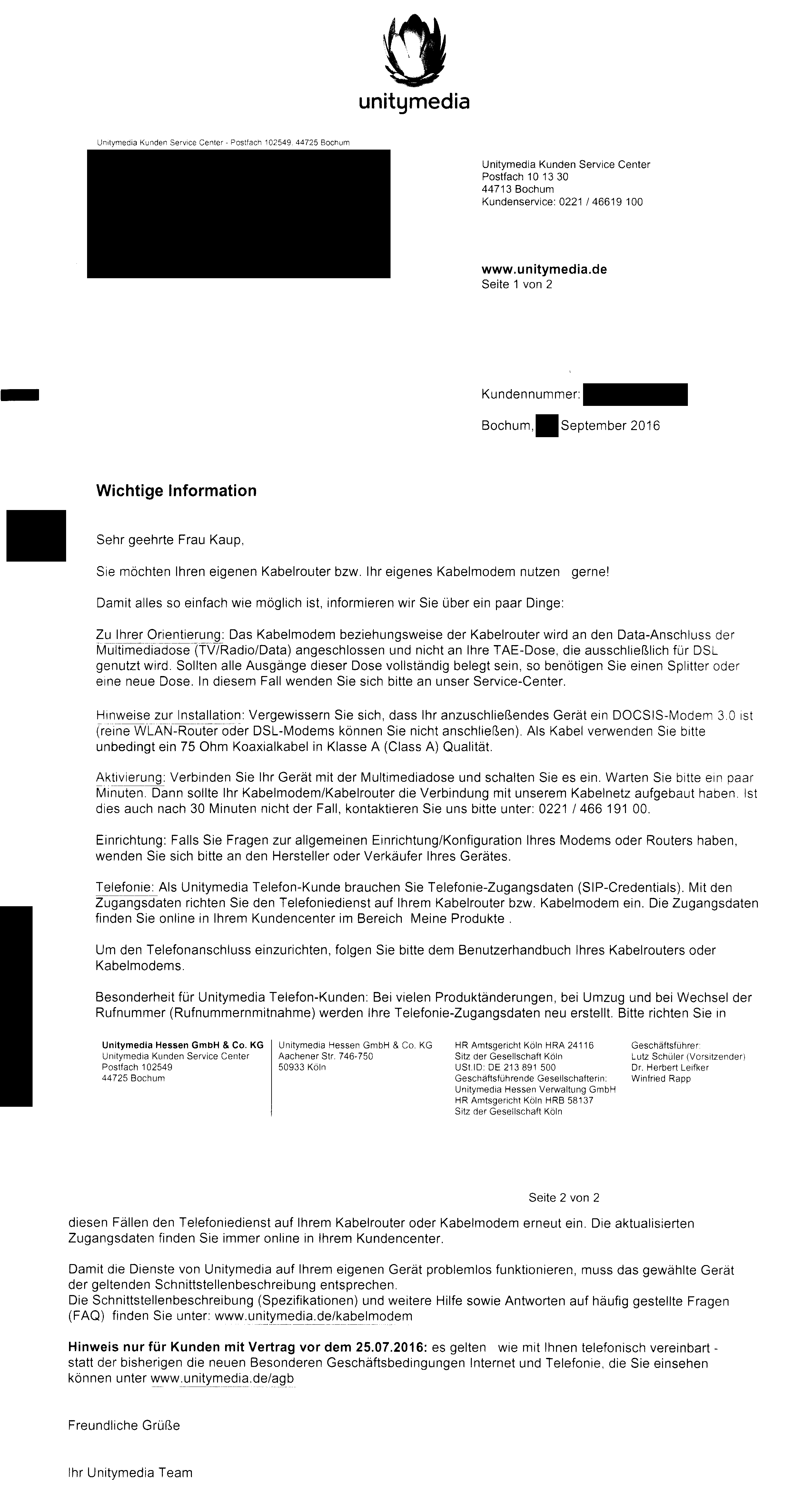
Donnerstag Brief: Infos zur Verwendung eigener Router

Samstag Brief: Bestellbestätigung
Eine Bestellbestätigung für 2play 120.000 wie bei Abschluss eines Neuvertrages. Hat vermutlich nichts mit dem Routerwechsel zu tun, sondern mit der versehentlichen Buchung der "Telefon Komfort" Option (mehrere Rufnummern, Zusatzfunktionen wie Makeln, besserer Provider-Router) durch den Hotline-Mitarbeiter (siehe unten).
nächste Woche: Hotline-Anruf: Rückwechsel
- Hotline-Navigation: 3 für Kundenservice, 2 für Produkt/Vertrag, 3 für "nicht Horizon/Mobil"
- keine Ansage Wartezeit, 13Min gewartet
- Anliegen: will Gerät zurück wechseln
- kein Problem, innerhalb der nächsten 3 Stunden
- bitte gleich nach dem Gespräch das TC7200U anschließen, damit der Auftrag nicht fehlschlägt
- Telefon-Komfort gebucht? Bestandteile (aber nicht "Telefon Komfort") im Kundencenter, Posten auf schriftl. Vertragsbestätigung
- Kollege hat sich wohl verklickt
- sie nimmt es wieder raus, schreibt mir den Betrag gut
- Entstehen Kosten? Nein/Gutschrift
Rückwechsel
- ~30min später die Fritz!Box abgesteckt, das TC7200U angesteckt & eingeschaltet
- wenige Minuten danach geguckt: uplink ist da. Das TC7200U rebooted noch ein paar mal (evtl wegen Firmware-update)
- Kundencenter zeigt nicht mehr die 3 Rufnummern etc. (Komfort-Bestandteile), und auch nicht mehr die SIP-Credentials
- Telefon ein- und ausgehend funktioniert
Sep 19, 2016
Recently I tried to archive the contents of our old MediaWiki
instance to a git repository. Somebody else had already
done that, using
some scripts from MediaWiki, but these ignored the page histories, saving
only the recent version for each page, and offered no possibility to also save uploaded files, especially images.
So I decided to see if I could do better, and found Git-Mediawiki.
I had to fiddle a bit, because of it not being installed, only copied, with archlinux' git package,
and our broken TLS certificate, but eventually got the import to work:
pacman -Sy perl-mediawiki-api perl-datetime-format-iso8601 perl-lwp-protocol-https
sudo ln -s /usr/share/git/mw-to-git/git-mw.perl /usr/lib/git-core/git-mw
sudo ln -s /usr/share/git/mw-to-git/git-remote-mediawiki.perl /usr/lib/git-core/git-remote-mediawiki
export PERL5LIB=/usr/share/git/mw-to-git/
export PERL_LWP_SSL_VERIFY_HOSTNAME=0 # this makes the whole TLS encryption insecure -- I use it because we don't have a valid certificate, and I don't intend to write back to the wiki
git clone mediawiki::https://wiki.chaos-darmstadt.de/w
The result is a linear history with one commit for each saved revision of any page. There seem to be some bugs, though:
- subpages are not exported, like our main pages' subsections "Hauptseite/Header" etc.
- some page histories occur twice in the git history, e.g. for page "Mate-Basteln"
Some of the things I did wrong when getting it to work:
Errors
-
wrong endpoint https://wiki.chaos-darmstadt.de/
fatal: could not get the list of wiki pages.
fatal: 'https://wiki.chaos-darmstadt.de/' does not appear to be a mediawiki
fatal: make sure 'https://wiki.chaos-darmstadt.de//api.php' is a valid page
fatal: and the SSL certificate is correct.
fatal: (error 2: 404 Not Found : error occurred when accessing https://wiki.chaos-darmstadt.de//api.php after 1 attempt(s))
fatal: Could not read ref refs/mediawiki/origin/master
-
Wrong endpoint https://wiki.chaos-darmstadt.de/wiki/
Searching revisions...
No previous mediawiki revision found, fetching from beginning.
Fetching & writing export data by pages...
Listing pages on remote wiki...
fatal: could not get the list of wiki pages.
fatal: 'https://wiki.chaos-darmstadt.de/wiki/' does not appear to be a mediawiki
fatal: make sure 'https://wiki.chaos-darmstadt.de/wiki//api.php' is a valid page
fatal: and the SSL certificate is correct.
fatal: (error 2: Failed to decode JSON returned by https://wiki.chaos-darmstadt.de/wiki//api.php
Decoding Error:
malformed JSON string, neither tag, array, object, number, string or atom, at character offset 0 (before "<!DOCTYPE html>\n<ht...") at /usr/share/perl5/vendor_perl/MediaWiki/API.pm line 400.
Returned Data:
<!DOCTYPE html>
<html lang="de" dir="ltr" class="client-nojs">
<head>
<meta charset="UTF-8" />
<title>Diese Aktion gibt es nicht â Chaos-Darmstadt Wiki</title>
... (all the HTML from the page) ...
fatal: Could not read ref refs/mediawiki/origin/master
-
PERL5LIB not set
Klone nach 'wiki' ...
Can't locate Git/Mediawiki.pm in @INC (you may need to install the Git::Mediawiki module) (@INC contains: /usr/lib/perl5/site_perl /usr/share/perl5/site_perl /usr/lib/perl5/vendor_perl /usr/share/perl5/vendor_perl /usr/lib/perl5/core_perl /usr/share/perl5/core_perl .) at /usr/lib/git-core/git-remote-mediawiki line 18.
BEGIN failed--compilation aborted at /usr/lib/git-core/git-remote-mediawiki line 18.
-
SSL/TLS cert not accepted. I work around by disabling the check, because I know the cert is broken, and I don't intend to write back to the wiki, so in the worst case my export attempt is tampered with. In general, always correctly check your certificates and treat this as an severe error!
Searching revisions...
No previous mediawiki revision found, fetching from beginning.
Fetching & writing export data by pages...
Listing pages on remote wiki...
fatal: could not get the list of wiki pages.
fatal: 'https://wiki.chaos-darmstadt.de/wiki/' does not appear to be a mediawiki
fatal: make sure 'https://wiki.chaos-darmstadt.de/wiki//api.php' is a valid page
fatal: and the SSL certificate is correct.
fatal: (error 2: 500 Can't connect to wiki.chaos-darmstadt.de:443 (certificate verify failed) : error occurred when accessing https://wiki.chaos-darmstadt.de/wiki//api.php after 1 attempt(s))
fatal: Could not read ref refs/mediawiki/origin/master
-
git remote helper mediawiki not installed (ln -s commands from above):
fatal: Unable to find remote helper for 'mediawiki'
Sep 14, 2016
Several sources on the Internet propose the ModelTest application to check whether custom QAbstractItemModel subclasses behave correctly. The application is contained in the official sources (Qt5 and Qt4), and documented (in a sense) in the official wiki. What is not clear, however:
- The mentioned
.pri file is missing, one version can be found on github
- Although not stated clearly, ModelTest is not something you can drop into your otherwise normal application, comparable to
Q_ASSERT statements. Instead, it's a unit test for the QTest framework, i.e. a standalone test of a separate model instance. If your model proxies a complex data structure which can not easily be recreated or mocked for the test, ModelTest is useless.
- Various versions of ModelTest are in the Qt repos, at KDE, and elsewhere. The ones in the Qt repositories got not many updates recently (last commit from 2016-01-21), so it's not clear if they are maintained at all
Mär 16, 2015
Feb 13, 2015
grun MyLexer tokens -tokens < testfile
invokes the TestRig on the Lexer spilling out the tokens it recognized. Example stdout:
[@0,0:9='google.com',<4>,1:0]
[@1,10:10='\n',<2>,1:10]
[@2,11:11='\t',<1>,2:0]
Format of this output: A list of tokens, where each is:
[@tokenIndex,startIndex:endIndex="spelling",<tokenId>,?:?]
or (if not default channel)
[@tokenIndex,startIndex:endIndex="spelling",<tokenId>,channel=channelId,lineNo:columnNo]
tokenIndex - in the whole output, starting at 0
startIndex,endIndex - char/byte? in the input stream
spelling - the literal text
tokenId - can be found in the .tokens file
channelId - index of the channel(?)
lineNo,columnNo - line, column of the token start
Tip: append | column -t -s, | less to create a table delimited at , and increase readability (and pass through less for paging).
This does not output "sub-tokens", i.e. only the highest level, not the ones these are assembled from.
Nov 02, 2014
grep -f patterns.txt is horribly slow. Even for l in cat patterns.txt ; do grep $l ; done is magnitudes faster.
Aug 15, 2014
Linking against a specific library version: http://stackoverflow.com/a/3393372
old:
new:
ld -l:libgif.so.1337
ld /lib/libgif.so.1337
This came up when writing https://github.com/azrdev/vlc-anigif. At the time, Archlinux had only giflib4 in its repos, but I needed functions from v5.
Aug 05, 2014
Today I learned: htop can show value history of the meters in the top bar:
Go to configure them, then select any which has a [mode] in square brackets behind it - F4 toggles that mode, including live preview of plain number view, ascii-graphed history, and "LED" which are big ascii-arted numbers.
Jul 31, 2014
Hat so eine Papierverbrennungs/-recyclingsanlage eigentlich nen Modul um weggeschmissenes Papiergeld rauszufiltern? So den Geburtstagsumschlag mit 200€ von Oma und so? Oder ist das einfach weg?
Jul 31, 2014
Heute gelernt: Wenn der Ofen nicht an geht, die Herdplatten aber tun, einfach mal die integrierte Uhr stellen - so als kleiner Schubs in Richtung "Strom ist wieder an, und wir bauen nicht mehr. Darfst weitermachen."
m(
Jul 15, 2014
How to destroy your linux system… in multiple acts:
- Brick your shell:
Jul 15, 2014
Some Unicode findings:
- 📳 U+1F4F3 : VIBRATION MODE
- 🚂 U+1F682 : STEAM LOCOMOTIVE
- 📢 U+1F4E2 : PUBLIC ADDRESS LOUDSPEAKER
- 🍝 U+1F35D : SPAGHETTI
Mai 01, 2013
How to exchange the DD-WRT firmware on your router by OpenWRT.
my Router: TL-WR1043ND Version (DE)v1.0
Old firmware: DD-WRT r19519
New firmware: OpenWRT "Attitude Adjustment" 12.09 Beta 2,
filename: openwrt-ar71xx-generic-tl-wr1043nd-v1-squashfs-factory.bin
First revert back to the original TP-Link firmware[1]. Use the Web flash interface and a special image[2]. This took very long in my case, first the 200sec in the browser counted down, and then some minutes passed where nothing happened. Finally the Browser showed a confirmation dialog reading "Update failed", but the router was unresponsive (no ping, no dhcp). I did a powercycle on it, then it was up and running fine, with the original firmware reading:
3.11.5 Build 100427 Rel.61427n
Hardware Version:
WR1043N v1 00000000
Then I simply put the openwrt /factory/ file from above into the Web flash formular and uploaded. Took some time, then OpenWRT was up and the LuCI Web interface asked to set a root password.
[1]: got this instruction from http://wiki.openwrt.org/doc/howto/generic.flashing#via.original.firmware
[2]: from here http://www.dd-wrt.com/phpBB2/viewtopic.php?t=85237
Feb 17, 2013
… on Archlinux:
wget -O /var/ftpd/ipxe.pxe http://releng.archlinux.org/pxeboot/
pacman -S tftp-hpa
sudo in.tftpd -L
append to dnsmasq-config on your dhcp-server:
dhcp-boot=/var/ftpd/ipxe.pxe,,<ip-of-tftp-server>
Feb 04, 2013
Disclaimer: this article is rather old, and does not reflect linux' current state of brightness on the Thinkpad E135
first, it was fixed on maximum. no tool could change it, /sys/class/backlight/acpi_video0/brightness could be written to and changed, but the backlight didn't. Tried the solutions in, excluding those which would just echo to above /sys/... file, until I found out Kernel parameter acpi_backlight=vendor did the trick.
Now /sys/class/backlight no longer contained an acpi_video0 directory, but a thinkpad_screen directory, that has the same brightness files, which change on using the Fn keys for brightness change.
If I write to them their content changes, but not the backlight, but at least the Fn key combos work.
Feb 04, 2013
On the Thinkpad Edge E135, ALSA recognizes 2 sound cards (0 and 1), of which #1 is the analog one I want to use and control - but not the default one. alsamixer can control it via selecting the entries in its F6 menu, but still it's not the default one. Creating this asound.conf fixes that.
Now KMix shows 2 open tabs (both with the label "HD Audio Generic"), one for each card. Unfortunately it defaults to control the digital output with its control-panel icon, too, and worse, the dialog to change that "Master Channel" gets confused by the identical names and just doesn't display any channel, so you can't change it. Fix: Stop KMix (dunno if that's really neccessary, but probably is), open ~/.kde4/share/config/kmixrc and set the MasterMixer= and MasterMixerDevice= entries in the [Global] section. MasterMixer specifies an equivalent to the ALSA card, but apparently 1-indexed (so here it was "ALSA::HD-Audio_Generic:1" and I set it to "ALSA::HD-Audio_Generic:2"), MasterMixerDevice tells the channel which should be controlled as Master ("IEC958:0" here, changed to "Master:0"). Simply look at the end of the section names and compare with the channels displayed in KMix beyond each tab (i.e. card), if you're unsure what entries to set.
Note: In later versions of KMix (IIRC around 4.15) this stopped to work, so I stayed on that version
Dez 01, 2012
tl;dr: WINEARCH=win32 creates a 32bit prefix, to confirm check if $WINEPREFIX/drive_c/Program Files (x86) exists
A wine prefix is a directory containing a lot of the files wine needs to simulate a windows installation. The "standard" wine prefix ~/.wine is used whenever you don't specify a different one in the environment variable $WINEPREFIX.
Now like a normal windows installation, the environment (e.g. the provided libraries) may be of either 32 or 64-bitness. Wine copies these libraries into the prefix when it is created, so you have to specify the desired bitness at that point, using the $WINEARCH environment variable. To create a 32bit prefix, just execute wine with $WINEPREFIX set, e.g.
WINEARCH=win32 WINEPREFIX=~/.wine_32bit winecfg
Finally, to check what bitness a given prefix has, just check if there is a directory drive_c/Program Files (x86) in the prefix - if there is, it's a 64bit prefix.